Blog

  • Maximize Your E-Rate Category 2 Budget: The Complete FY2026–2030 Planning Guide

    Maximize Your E-Rate Category 2 Budget: The Complete FY2026–2030 Planning Guide

    A new 5-year Category 2 budget cycle just launched with higher per-student allocations and a bigger funding floor. Here’s how to plan smart, spend strategically, and get the most out of every dollar.

    Every five years, the E-Rate program resets its Category 2 (C2) budgets — and for schools and libraries across the United States, that reset is a major opportunity. The FY2026–2030 cycle just launched, and it comes with the biggest per-student allocation in E-Rate history.

    But here’s the catch: how you use your C2 budget in Year 1 directly shapes what’s available for Years 2 through 5. Make smart decisions now and you can modernize your entire internal network. Make hasty ones and you’ll be stretching thin dollars over the back half of the cycle.

    This guide gives you a clear framework for understanding your new Category 2 budget, planning strategically across the five-year cycle, and avoiding the most common mistakes applicants make.
    What Is Category 2 Funding?

    E-Rate funding is divided into two categories:

    Category 1: Covers external connectivity — internet access, fiber transport, data transmission, voice services

    Category 2: Covers the internal network — Wi-Fi access points, network switches, structured cabling, managed internal broadband services (MIBS), and basic maintenance of internal connections (BMIC)

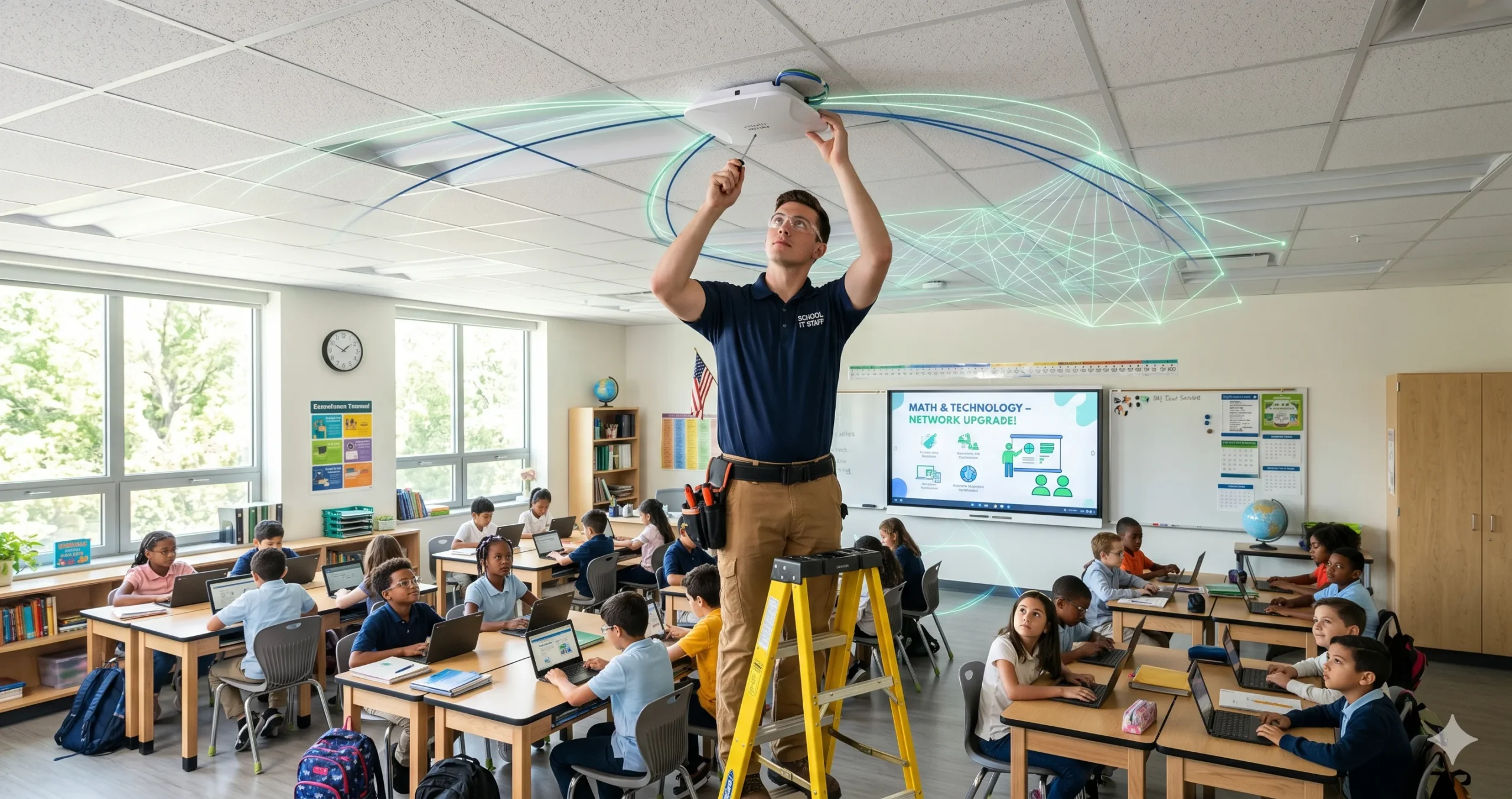
    Category 2 is what puts the internet in the hands of students and library patrons. Even if your Category 1 broadband pipe is excellent, a dated or overloaded internal network kills performance in classrooms and reading rooms.

    Category 2 funding is allocated on a 5-year rolling budget per school building or library branch — not a per-year grant. You control when and how you spend it within the cycle.

    Your New FY2026–2030 Budget: The Numbers

    Per-Student Allocation

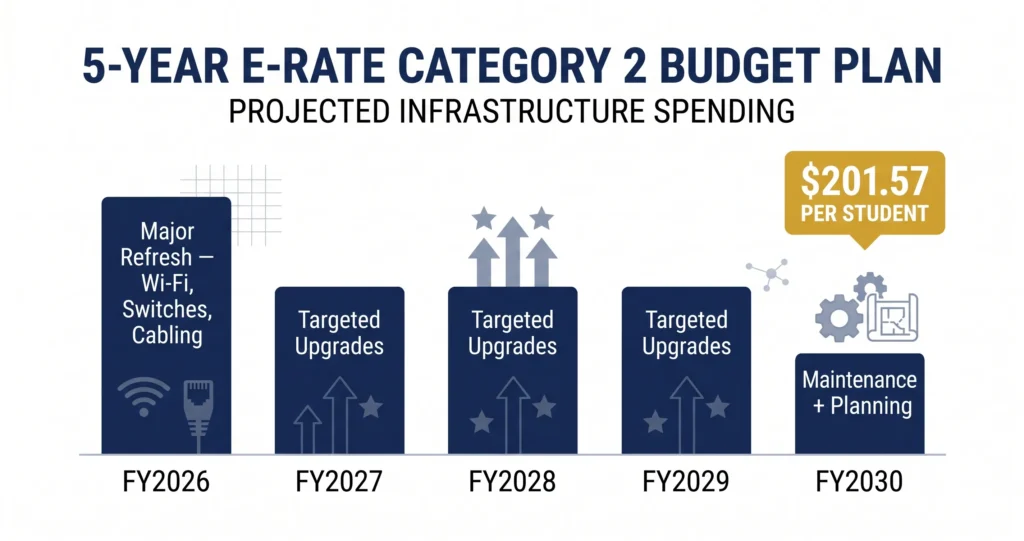
    The new C2 budget for FY2026–2030 is $201.57 per student — a 20.7% increase over the prior FY2021–2025 cycle.

    This number is based on the student count you certify in your first year of the new cycle. That count gets locked in and determines your total five-year Category 2 budget. Choose your base year count carefully and make sure it reflects your current enrollment accurately.

    Funding Floors

    Smaller schools and libraries with low enrollment or patronage counts benefit from minimum budget guarantees:

    | Entity Type | FY2026–2030 Funding Floor |

    Schools / School Districts $30,175 (up from $25,000)

    Libraries / Library Systems $30,175 (up from $25,000)

    Tribal Libraries $66,385 (up from $55,000)

    If your per-student calculation falls below the floor, you automatically receive the floor amount.

    How to Check Your Budget

    You can look up your exact Category 2 budget using USAC’s free Category 2 Budget Tool at [USAC.org](https://www.usac.org/e-rate/). Enter your Billed Entity Number (BEN) to see:

    – Your total five-year C2 budget

    – Annual spending to date

    – Remaining available balance

    > Pro Tip: Check your C2 budget balance at the start of each funding year — before you plan projects, before you file a Form 470. Knowing exactly what’s available prevents you from over-committing or under-spending.

    What Category 2 Funding Covers

    Eligible Category 2 products and services include:

    Internal Connections (IC)

    – Wi-Fi access points and wireless controllers

    – Network switches (managed and unmanaged)

    – Structured cabling (horizontal and backbone)

    – UPS (Uninterruptible Power Supply) units supporting eligible equipment

    – Racks and related hardware

    Managed Internal Broadband Services (MIBS)

    – Third-party managed Wi-Fi or managed network services

    Basic Maintenance of Internal Connections (BMIC)

    – Repair and maintenance of eligible Category 2 equipment

    – Wire and cable testing

    – Software upgrades for eligible hardware (if part of a maintenance contract)

    What’s NOT covered:

    – End-user devices (laptops, tablets, desktops, printers)

    – Servers (except under limited circumstances)

    – Software not directly tied to eligible hardware maintenance

    – Security cameras or building access systems

    – Higher education institutions (E-Rate is K-12 and public libraries only)

    How to Plan Your 5-Year Budget Strategically

    Year 1: Go Big on Infrastructure

    Year 1 of a new cycle is the ideal time to execute your biggest, most capital-intensive projects. Core network hardware — switches, access points, and structured cabling — typically carries a 3–5 year useful life, which maps almost perfectly to the five-year budget cycle.

    Recommended Year 1 priorities:

    – Full wireless infrastructure refresh (access points + controllers)

    – Core and distribution switching upgrades

    – Structured cabling where needed (especially in older buildings)

    – POE (Power over Ethernet) switching to support modern Wi-Fi standards (Wi-Fi 6/6E)

    Front-loading your spend in Year 1 means you execute the full upgrade now, when costs are predictable and the equipment will serve you through the entire cycle.

    Years 2–4: Fill in the Gaps

    After Year 1’s major refresh, use the remaining budget for:

    – Secondary buildings or annexes that couldn’t be addressed in Year 1

    – Managed internal broadband services (MIBS) if you prefer an outsourced model

    – Additional switches or access points for new construction or relocated classrooms

    – Basic maintenance contracts (BMIC) on Year 1 equipment

    Year 5: Maintenance and Planning for Cycle 4

    The final year of the cycle is a planning year as much as a spending year:

    – Use remaining funds for BMIC (maintenance contracts)

    – Conduct a full network audit to document what will need replacement in the next cycle

    – Begin conversations with vendors early — you want competitive bids ready when the FY2031–2035 window opens

    > Important Note: Unused Category 2 budget does not roll over into the next five-year cycle. If you don’t spend it within FY2026–2030, it’s gone. Plan to use your full allocation.

    Step-by-Step: How to Maximize Your C2 Budget

    Step 1 — Audit Your Current Infrastructure

    Walk every building. Inventory every switch, access point, cable run, and patch panel. Note the age, condition, and capacity of each component. This audit is the foundation of your E-Rate project plan.

    Step 2 — Map Your Needs to Eligible Services

    Cross-reference your infrastructure gaps with the E-Rate Eligible Services List (ESL) for FY2026. Make sure every item you plan to request is clearly eligible under the current ESL before you build your project scope.

    Step 3 — Calculate Your Total Available Budget

    Use USAC’s Category 2 Budget Tool to confirm your exact five-year allocation. Factor in your discount percentage (based on NSLP eligibility and urban/rural designation — ranging from 20% to 90%).

    Step 4 — Prioritize Projects by Impact and Urgency

    Rank your projects: What’s most likely to directly impact student learning? What’s failing or end-of-life? What has the broadest reach? Lead with high-impact, high-urgency items.

    Step 5 — File Form 470 Early

    Describe your Category 2 project scope on Form 470 to open the competitive bidding process. Be thorough but not overly prescriptive — you want real competitive bids, not just one vendor responding.

    Step 6 — Evaluate Bids Carefully

    The E-Rate program requires you to select the most cost-effective bid, with price being the primary factor. Document your bid evaluation process — USAC may ask for it during Program Integrity Assurance (PIA) review.

    Step 7 — File Form 471 on Time

    Submit your funding request within the Form 471 filing window. Include all FRNs (Funding Request Numbers) for your C2 projects.

    Common Category 2 Budget Mistakes

    Mistake 1: Not locking in enrollment counts accurately in Year 1

    Your entire five-year C2 budget is based on the student count you certify in your first application year of the cycle. An undercount means a smaller budget for the full five years — with no way to correct it later.

    Mistake 2: Buying ineligible equipment

    End-user devices, servers, and software not tied to eligible hardware are not covered. Double-check the current Eligible Services List before finalizing your scope.

    Mistake 3: Waiting until Year 3 or 4 to start

    Some schools hold off because the process feels complex. But the longer you wait, the more your equipment deteriorates — and the less time you have to complete projects before the cycle ends.

    Mistake 4: Ignoring the CIPA requirement

    All Category 2 funding requires CIPA compliance certification. If your internet safety policy is out of date or your filtering technology isn’t properly documented, you could lose your entire C2 request.

    Mistake 5: Not planning for the matching requirement

    Your E-Rate discount covers a percentage of eligible costs. Your school or district must cover the rest (the non-discounted share). Make sure your local budget is aligned before committing to large projects.

    Key Takeaways

    — The new FY2026–2030 Category 2 budget is $201.57 per student a 20.7% increase over the prior cycle

    – The funding floor for smaller entities is now $30,175 (Tribal libraries: $66,385)

    – Your five-year budget is locked based on the enrollment count you certify in Year 1 of the cycle

    – Front-load major infrastructure projects in Year 1 — switches, access points, cabling

    – Use USAC’s free Category 2 Budget Tool to check your exact balance before planning

    – Unused C2 budget does not roll over, plan to use your full allocation by FY2030

    CIPA compliance is required for all Category 2 requests

    Start Planning Your Network Upgrade Today

    The FY2026–2030 Category 2 cycle is the best opportunity in five years to modernize your school or library network — and with full funding confirmed for FY2026, there’s never been a better time to apply.

    E-Rate Compass has the resources, checklists, and expert guidance to help you make the most of every dollar in your Category 2 budget. Whether you’re planning a single-building Wi-Fi upgrade or a district-wide network refresh, we’re here to help you do it right.

    Download our free Category 2 Budget Planning Checklist or contact us today to talk through your project scope.

    Sources: [FY2026–2030 Category Two Funding Adjustments — FundsForLearning](https://www.fundsforlearning.com/news/fy2026-2030-e-rate-category-two-funding-adjustments/) | [New Category 2 E-Rate Budgets — Turn-Key Technologies](https://www.turn-keytechnologies.com/blog/category-two-funding-adjustments) | [HWC Consultants — FY2026 Application Window Opens](https://www.hwc-consultants.com/blog/latest-updates-on-e-rate-funding) | [USAC CIPA Requirements](https://www.usac.org/e-rate/applicant-process/starting-services/cipa/)

  • How to File Form 470 and Form 471 for E-Rate: A Step-by-Step Guide for Schools and Libraries

    How to File Form 470 and Form 471 for E-Rate: A Step-by-Step Guide for Schools and Libraries

    Confused by the E-Rate application process? This plain language guide walks you through Form 470 and Form 471 — the two most critical steps to securing funding for your school or library.

    Every year, thousands of schools and libraries leave E-Rate money on the table — not because they’re ineligible, but because the application process feels complicated. Two forms sit at the heart of that process: FCC Form 470 and FCC Form 471.

    Get these two right, and you’ve cleared the biggest hurdle in the entire E-Rate program. Get them wrong — or miss a deadline — and you could lose an entire year of funding.

    This guide walks you through both forms in plain language: what they are, why they matter, what happens if you miss a step, and exactly how to file them correctly.

    Understanding the Big Picture First

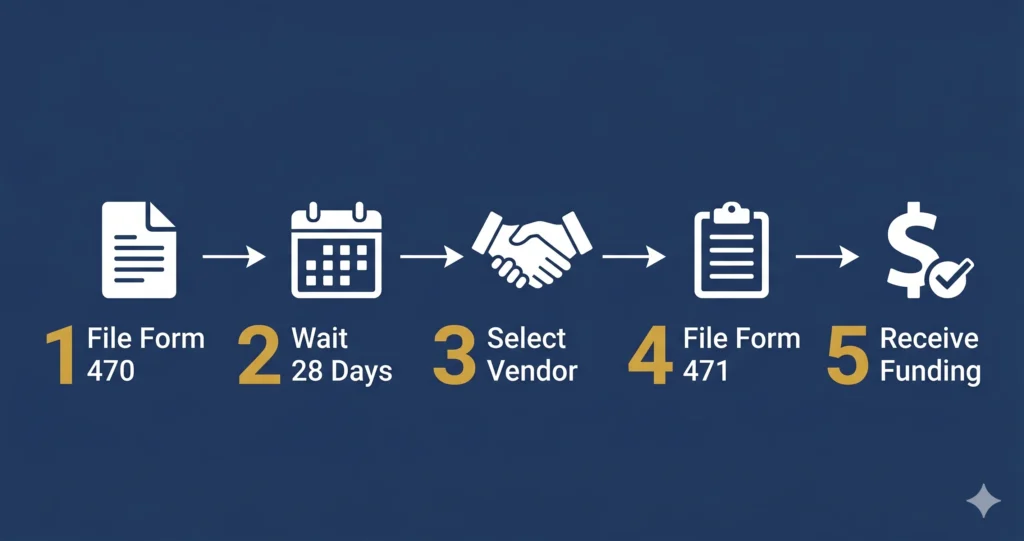
    Before diving into the forms, it helps to understand the overall E-Rate application sequence:

    1. File Form 470→ Launch the competitive bidding process

    2. Wait 28 days → Allow vendors to submit bids

    3. Evaluate bids, select a vendor, sign a contract

    4. File Form 471 → Formally request your E-Rate discount

    5. Wait for your FCDL → Receive your Funding Commitment Decision Letter from USAC

    6. File Form 486 → Activate your funding commitment

    7. Receive discounts or reimbursements via SPI or BEAR

    Form 470 and Form 471 are steps 1 and 4 — and everything else flows from them.

    FCC Form 470: Starting the Competitive Bidding Process

    What Is Form 470?

    Form 470, officially the Description of Services Requested and Certification Form, is your public announcement to the marketplace that your school or library is seeking bids for telecommunications, broadband, or internal network services.

    Filing Form 470 is mandatory before you can receive E-Rate discounts. It kicks off the required competitive bidding process and puts vendors on notice that you’re in the market.

    What Does It Cover?

    You’ll describe the services you’re seeking — for example:

    Category 1: Internet access, fiber transport, WAN services

    Category 2: Wireless access points, managed switches, structured cabling, managed internal broadband services

    You’re not committing to anything at this stage. You’re inviting bids.

    Step-by-Step: How to File Form 470

    Step 1 — Log into EPC

    All E-Rate forms are filed through USAC’s E-Rate Productivity Center (EPC) at [usac.org](https://www.usac.org/e-rate/). If you don’t have an EPC account, create one and register your school or library entity first.

    Step 2 — Update Your Entity Profile

    Before filing, make sure your entity profile (school name, address, enrollment count, NSLP data) is accurate. The administrative window to update profiles typically closes about a week before the Form 471 filing window opens.

    Step 3 — Create a New Form 470

    Inside EPC, navigate to “FCC Forms” and select Form 470. Choose the correct funding year and service type.

    Step 4 — Describe Your Services

    Be specific but not overly restrictive. Overly narrow descriptions can eliminate competitive bids. If you’re open to multiple technologies (fiber vs. cable broadband, for example), say so.

    Step 5 — Certify and Submit

    An authorized person (typically the E-Rate coordinator or a school official) must certify and submit the form. Once submitted, it becomes publicly visible on the USAC website.

    > Pro Tip: File your Form 470 as early as possible, ideally in January or early February for a spring Form 471 deadline. The later you file, the less time vendors have to submit competitive bids, and the less time you have to evaluate them properly.

    The 28-Day Rule

    After you certify your Form 470, you must wait a minimum of 28 days before signing any contracts or filing Form 471. This is a hard rule, no exceptions. USAC enforces it strictly, and violating it can result in your application being denied.

    The last date to certify a Form 470 for FY2026 while still meeting the 28-day waiting period before the Form 471 deadline was March 4, 2026.

    FCC Form 471: Requesting Your Discount

    What Is Form 471?

    Form 471, officially the Description of Services Ordered and Certification Form, is your actual funding request. This is where you tell USAC: “I’ve completed the bidding process, I’ve selected a vendor, and here are the services I’m requesting a discount on.”

    Filing Form 471 opens the door to your funding commitment.

    What You’ll Need Before You File

    – Your certified Form 470 (and the 28-day waiting period must have passed)

    – A signed contract or service agreement with your selected vendor

    – The vendor’s SPIN (Service Provider Identification Number)

    – Your school/library’s Billed Entity Number (BEN)

    – Your Category 2 budget information (if filing a Category 2 request)

    – CIPA certification (see below)

    Step-by-Step: How to File Form 471

    Step 1 — Log into EPC

    Navigate to “FCC Forms” and start a new Form 471 for the correct funding year.

    Step 2 — Select Your Billed Entity

    Confirm the entity (school, library, or consortium) you’re filing on behalf of.

    Step 3 — Add Funding Requests (FRNs)

    Each service you’re requesting a discount on gets its own Funding Request Number (FRN). For each FRN, you’ll enter:

    – The associated Form 470

    – The service type and category

    – The vendor (service provider) and their SPIN

    – Contract details (contract number, start/end dates)

    – Annual cost and requested discount amount

    Step 4 — Certify CIPA Compliance

    To receive E-Rate discounts on Category 1 internet access and all Category 2 services, your school or library must certify compliance with the Children’s Internet Protection Act (CIPA). This means you have:

    – Adopted an internet safety policy

    – Deployed technology protection measures (content filtering)

    – Held a public hearing on your internet safety policy (for new adopters)

    Schools have two additional CIPA requirements: monitoring minors’ online activity and providing cyberbullying education.

    Step 5 — Certify and Submit

    An authorized person must certify the form. Review everything carefully before submitting — errors discovered after submission require a USAC service request to correct.

    Step 6 — Watch for Your RAL

    After submission, USAC sends a Receipt Acknowledgment Letter (RAL) to you and your service provider through EPC. Review it immediately — it’s your chance to catch and correct mistakes before USAC begins its review.

    > Important Note: The FY2026 Form 471 filing window ran from January 21, 2026 to April 1, 2026 at 11:59 p.m. ET. Missing the window means waiting until FY2027. Mark these dates in your calendar well in advance.

    Common Mistakes to Avoid

    Mistake, Why It Matters

    Filing Form 471 before the 28-day waiting period ends | Automatic denial, no waiver available

    Selecting a vendor not listed on your Form 470 | May result in denial during PIA review

    Incorrect enrollment or NSLP data | Affects your discount percentage — can cost thousands

    Missing the Form 471 filing window | Lose an entire year of funding

    Not updating EPC entity profile before the admin window closes Can delay or invalidate your application |

    Incomplete CIPA certification | Disqualifies your Category 1 and Category 2 requests

    After You File: What Happens Next

    Once your Form 471 is submitted and in USAC’s queue, here’s what to expect:

    1. PIA Review: USAC’s Program Integrity Assurance team may contact you with questions. Respond promptly — delays here can push your funding decision back significantly.

    2. FCDL: Your Funding Commitment Decision Letter arrives (typically in the summer/fall following the filing window). It either approves, partially approves, or denies your requests.

    3. Form 486: File this within 120 days of your FCDL issue date (or service start date, whichever is later) to activate your commitment.

    4. Invoicing: Work with your service provider to ensure invoices are submitted correctly via the SPI method, or file Form 472 (BEAR) for reimbursement.

    Key Takeaways

    Form 470 starts the competitive bidding process — file it early and be thorough

    – The 28-day waiting period between Form 470 and Form 471 is non-negotiable

    Form 471 is your actual funding request have all vendor and contract details ready before you start

    CIPA compliance is required for all Category 1 internet and Category 2 funding requests

    – Watch for your RAL after submission and correct errors immediately

    – Missing deadlines means waiting a full year put filing windows in your calendar now

    Ready to File? We Can Help.

    The E-Rate application process has a lot of moving parts, but you don’t have to navigate it alone. E-Rate Compass provides plain-language guides, deadline trackers, and expert resources to help schools and libraries get every dollar they’re entitled to.

    Explore our resources or contact us for a free consultation to make sure your next application is filed correctly, on time, and fully optimized.

    Sources: [USAC — FY2026 Form 471 Filing Window](https://www.usac.org/e-rate-announcements/funding-year-fy-2026-fcc-form-471-application-filing-window-opens-january-21-2026/) | [E-Rate Deadlines 2026](https://erateapp.com/guides/e-rate-deadlines-2026.html) | [USAC Form 471 Filing Guide](https://www.usac.org/e-rate/applicant-process/applying-for-discounts/fcc-form-471-filing/) | [FCC CIPA Requirements](https://www.fcc.gov/consumers/guides/childrens-internet-protection-act)

  • FY2026 E-Rate Sets All Time Record: Every Eligible Request Will Be Fully Funded

    FY2026 E-Rate Sets All Time Record: Every Eligible Request Will Be Fully Funded

    Schools and libraries requested a historic $3.51 billion in E-Rate support for FY2026 — and the FCC confirmed every eligible dollar will be funded. Here’s what that means for you.

    If you filed an E-Rate application for Funding Year 2026, you just got some of the best news in the program’s history.

    On May 11, 2026, the Federal Communications Commission FCC announced that the Universal Service Administrative Company USAC will fully fund every eligible Category One and Category Two E-Rate request for FY2026 — no proration, no cuts, no waitlists. That’s a landmark moment, and it didn’t happen by accident.

    This post breaks down exactly what happened, why demand hit record levels, and what actions you should take right now to make the most of this funding environment.

    What Happened: A Historic Funding Year?

    Record-Breaking Demand

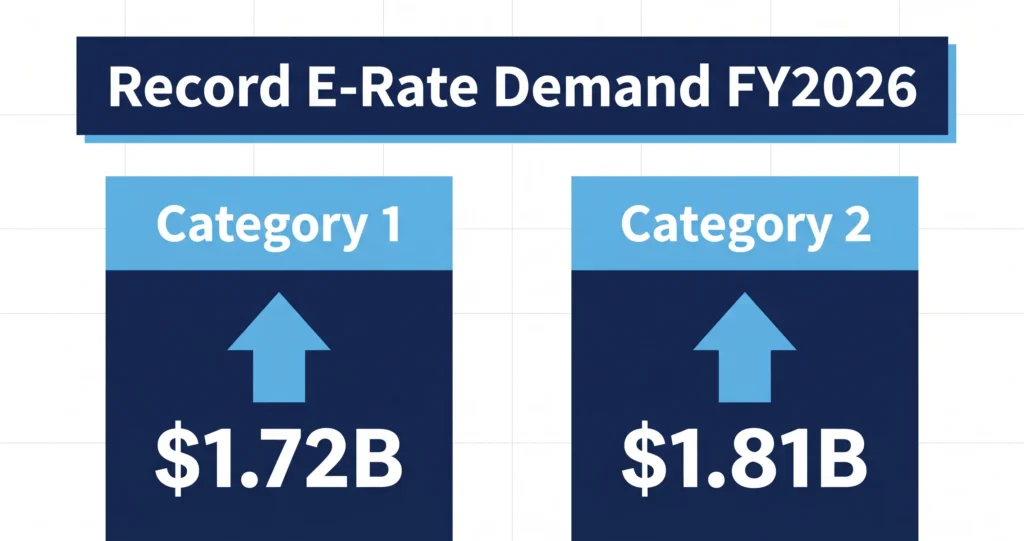
    Schools and libraries across the United States submitted a combined $3.51 billion in E-Rate funding requests for FY2026 — the highest total in the modern E-Rate era.

    Breaking it down by category:

    Category 1 (internet access and data transmission): $1.72 billion

    Category 2 (internal connections, Wi-Fi, switches, cabling): $1.81 billion

    That second number is the real headline. For the first time ever, Category 2 demand exceeded Category 1. That shift tells you something important about where schools and libraries are investing: not just in getting internet to the building, but in getting it to every student and patron inside it.

    Why the Surge in Category 2?

    The spike in Category 2 demand is directly tied to the launch of the new FY2026–2030 five year budget cycle. After the FY2021–2025 cycle ended, millions of schools and libraries entered the new cycle with a clean slate — and a bigger budget.

    The new per-student allocation jumped to $201.57 (up from the prior cycle), and the funding floor for smaller schools and libraries rose to $30,175. Tribal libraries saw their floor increase to $66,385.

    That unlocked years of pent-up demand. Schools that had been holding off on Wi-Fi upgrades, switch replacements, and structured cabling projects finally had the budget and the green light to move forward. A record 12,210 applicants filed for Category 2 funding, the most in E-Rate history.

    Full Funding Confirmed

    The FY2026 program funding cap was set at $5.2 billion, a 2.8% inflation-adjusted increase over FY2025. With an additional $600 million in unused prior year carryover funds, total available funding reached approximately $5.8 billion well above the $3.51 billion in demand.

    The math was clear: there was enough money to cover everyone. The FCC made it official.

    Important Note: Full funding applies to eligible requests only. Applications that contain errors, missing certifications, or ineligible services may still be reduced or denied during USAC’s Program Integrity Assurance (PIA) review. Make sure your application is clean.

    What This Means for Schools and Libraries? If You Already Filed

    If your Form 471 was submitted and certified before the April 1, 2026 deadline, you are in line to receive a Funding Commitment Decision Letter (FCDL) from USAC. Once you receive your FCDL:

    1. Review it carefully for accuracy entity names, service provider details, and funding amounts

    2. File FCC Form 486 to activate your funding commitment and confirm CIPA (Children’s Internet Protection Act) compliance

    3. Coordinate with your service provider on service start dates

    4. Track reimbursements through Form 472 (BEAR) or the Service Provider Invoice (SPI) method

    If You Missed the FY2026 Window

    The Form 471 filing window for FY2026 closed on April 1, 2026. If you didn’t file in time, don’t panic but do start planning now for FY2027.

    – The FY2027 Form 470 filing season typically opens in the summer/fall of 2026

    – Begin your technology needs assessment and vendor outreach now

    – Make sure your EPC (E-Rate Productivity Center) profile is up to date and your entity information is current before the administrative window closes

    For First-Time Applicants

    If you’ve never applied for E-Rate funding before, FY2026’s full-funding announcement is a powerful signal: the money is there, and the program works. The biggest barrier for new applicants is usually the process itself — not the eligibility.

    Start by visiting [USAC.org](https://www.usac.org/e-rate/) and registering your school or library in the EPC. Consider working with an E-Rate consultant if the process feels overwhelming many offer free initial assessments.

    The Bigger Picture: Network Modernization Is Accelerating

    The FY2026 demand data signals more than just a good year it reflects a fundamental shift in how schools and libraries are thinking about connectivity.

    The last mile of connectivity, the Wi-Fi access points, managed switches, and structured cabling inside buildings is now recognized as just as critical as the internet pipe coming into the building. Students can’t learn on fast internet if the school’s internal network is a bottleneck.

    The record Category 2 demand shows that school technology leaders are getting that message and acting on it. With the full 5-year budget cycle now underway, expect FY2027 through FY2030 demand to remain elevated as institutions execute multi-year network modernization roadmaps.

    Key Takeaways

    – FY2026 E-Rate demand hit an all-time record of $3.51 billion

    – The FCC confirmed 100% of eligible requests will be fully funded — no proration

    – Available funding (~$5.8B) exceeded demand (~$3.51B) by a wide margin

    – Category 2 demand exceeded Category 1 for the first time, driven by the new FY2026–2030 budget cycle

    – A record 12,210 applicants filed for Category 2 — the most in E-Rate history

    – If you filed, watch for your FCDL and file Form 486 promptly to activate your commitment

    What’s Next for You?

    Whether you’re waiting on your FCDL, planning your FY2027 application, or just learning about E-Rate for the first time the program is more accessible and better-funded than ever.

    Subscribe to the E-Rate Compass newsletter to get deadline reminders, funding updates, and plain-language guidance delivered directly to your inbox. We cut through the USAC jargon so you don’t have to.

    Sources: [FundsForLearning — Record-Breaking E-rate Demand](https://www.fundsforlearning.com/news/record-breaking-e-rate-demand-schools-and-libraries-send-a-clear-message-in-fy2026/) | [FCC Confirms Full Funding for FY2026](https://www.fundsforlearning.com/news/every-eligible-fy2026-e-rate-request-will-be-fully-funded/) | [FY2026 Funding Cap: $5.2 Billion](https://www.fundsforlearning.com/news/fy2026-e-rate-funding-cap-5-2-billion/) | [USAC E-Rate](https://www.usac.org/e-rate/)*